Electro+electron-rebuild+ffi
使用electron写了个桌面工具,需要发通知给其他软件。打算借助ffi模块实现。
然后地狱的开端,照着官方文档操作,然后各种问题各种错。
开始以为系统软件冲突,脑子一热。系统重装...
干净了以为就好了,好吧,我想多了。
抱怨到此为止,开始说实在的记录过程。
这里重要的事情说三遍,支持版本为:<font color="#ff0000">node.js V10.16.0,electron V4.2.5</font>(这里感谢网友告知!)。
安装ffi模块需要先安装[node-gyp 。](https://github.com/nodejs/node-gyp)
安装node-gyp需要先安装
1. 1.python2
2. [2.windows-build-tools](https://github.com/felixrieseberg/windows-build-tools)
3.
开始安装:
1.下载 [node.js](https://nodejs.org/download/release/v10.16.0/),安装。
2.安装[Visual Studio Build Tools](https://visualstudio.microsoft.com/thank-you-downloading-visual-studio/?sku=BuildTools)
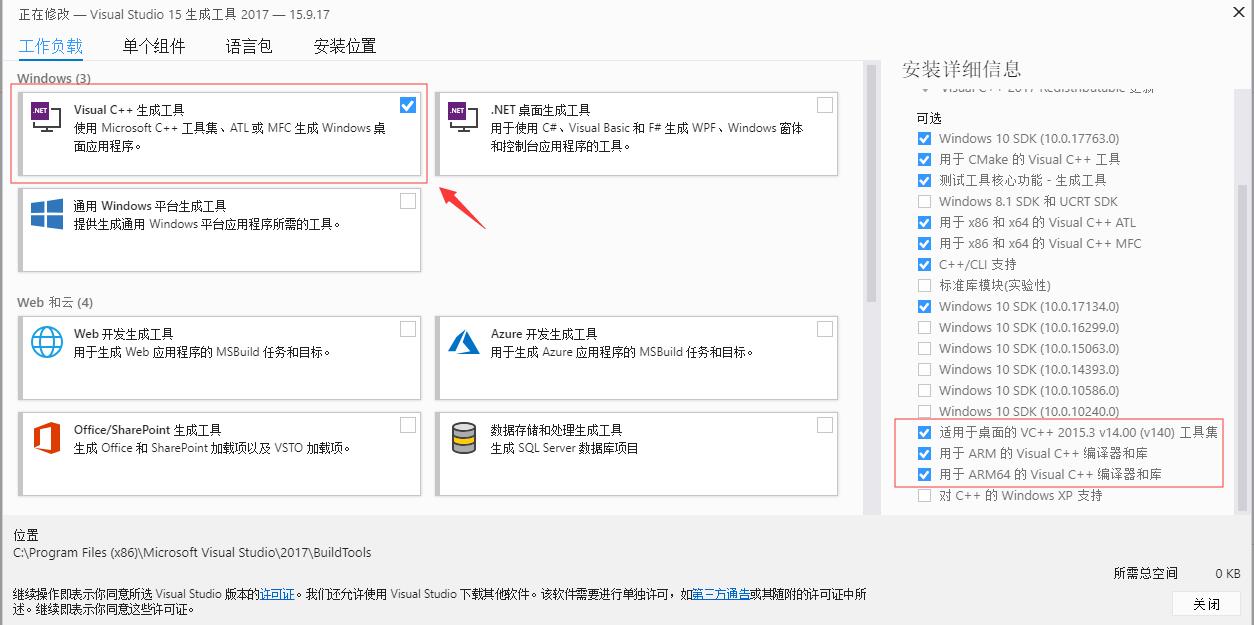
```
npm config set msvs_version 2017
```
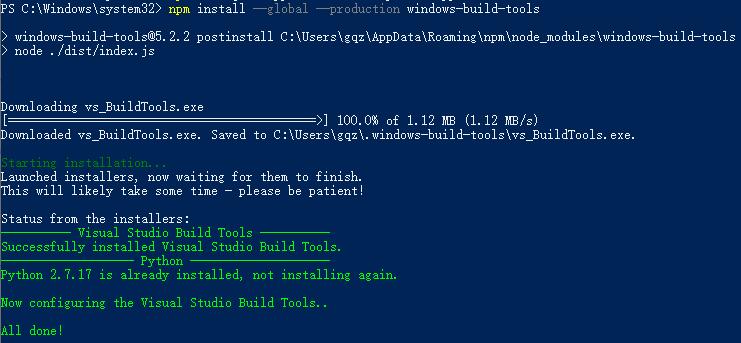
3.安装[windows-build-tools (cmd 管理员模式) ](https://github.com/felixrieseberg/windows-build-tools)
```
npm install --global --production windows-build-tools
```
```
npm config set python E:\tool\Python27\python.exe //路径换成自己的
```
4.安装node-gyp npm install -g node-gyp
5.创建项目目录 ,例如d:\\test\_ffi
切换到d:\\test\_ffi目录下执行以下命令:
```
npm init
npm install --save-dev electron@4.2.5
npm install --save-dev electron-rebuild
```
[初始化项目](https://electronjs.org/docs/tutorial/first-app#electron-development-in-a-nutshell)
6.安装ffi
```
npm install ffi --save
```
7.出现 warning C4996:‘Nan::Callback::Call’: 被声明为已否决问题
<div>执行以下命令:</div>```
.\node_modules\.bin\electron-rebuild -d=http://npm.taobao.org/mirrors/atom-shell -v 4.2.5 .\node_modules\ffi\
```
8.rebuild Complete

运气好的话,到这里就完成了。
小技巧:
全局设置下载源:
```
npm config set registry https://npm.taobao.org/mirrors/node
```
下载node源码加速:
```
npm config set disturl https://npm.taobao.org/mirrors/node
```
将electron包下载地址注册位淘宝的镜像:
```
npm config set ELECTRON_MIRROR https://npm.taobao.org/mirrors/electron/
```
或者找到你的个人目录里面的.npmrc文件打开文件写入下面的配置:
```
registry=https://registry.npm.taobao.org/
disturl=https://npm.taobao.org/mirrors/node
ELECTRON_MIRROR=https://npm.taobao.org/mirrors/electron
```
electron-rebuild用国内源构建加速
========================
```
electron-rebuild -d=http://npm.taobao.org/mirrors/atom-shell -v x.xx.xx
```
评论区